WordPress security plugin

Attacks stop at the door.

Hot Shield blocks attacks before your other plugins even load, locks out password guessers and checks every file on your site.

No account needed. Nothing about your visitors leaves your site.

168attack and break-in tests the plugin passes before every release
12,624clean WordPress files scanned with zero false alarms
<1 msadded to a page by the firewall check
$0for the full free plugin, with two-factor login for every role
How it works

Five layers between an attacker and your site.

Each one catches what gets past the one before. All five are in the free plugin.

01 / BEFORE WORDPRESS

The firewall.

It loads before every other plugin, so an attack on a plugin's security hole is stopped before that plugin ever runs.

  • Blocks SQL injection, script injection, path tricks and uploaded scripts.
  • Turns off XML-RPC, the old door most password attacks use.
  • Repairs itself if someone deletes it, and tells you.
  • Country blocking and automatic bansPRO
02 / BOTS AND SCOUTS

The bot guard.

Attackers start by finding your usernames and pointing bots at your forms. Hot Shield gives them nothing.

  • Invisible bot check on login, sign-up and comment forms. No puzzles for people.
  • Hidden usernames: no user lists, no author scans.
  • The lost-password form never says whether an account exists.
03 / AT THE LOGIN

The login guard.

Where attackers spend most of their time, and where most of them give up.

  • An IP that keeps guessing is locked out. Usernames never are, so nobody can lock you out.
  • Leaked passwords are refused. Only 5 characters of a scrambled copy are ever checked.
04 / EVEN WITH THE PASSWORD

Two-factor login.

A stolen password is not enough. Free for every role, not only administrators.

  • Works with Google Authenticator, Microsoft Authenticator and 1Password.
  • Set up in seconds: scan a QR code, drawn on your own site so the secret never leaves it.
  • 8 backup codes for the day you lose your phone.
05 / ON YOUR SERVER

The file scan.

If something did get in, you hear about it, with a plain explanation and the next step.

  • Every WordPress and plugin file compared with the official copy.
  • Plugins and themes checked for known security holes.
  • Malware check for common backdoors and PHP hidden in uploads.
  • Server check: PHP and database versions that no longer get security fixes or have known holes, plus risky server settings.
  • Activity log and email alerts for logins, new admins and changed settings.
Inside WordPress

One screen. What's wrong, and what to do.

It looks like WordPress because it lives there. No new dashboard to learn, no account to make.

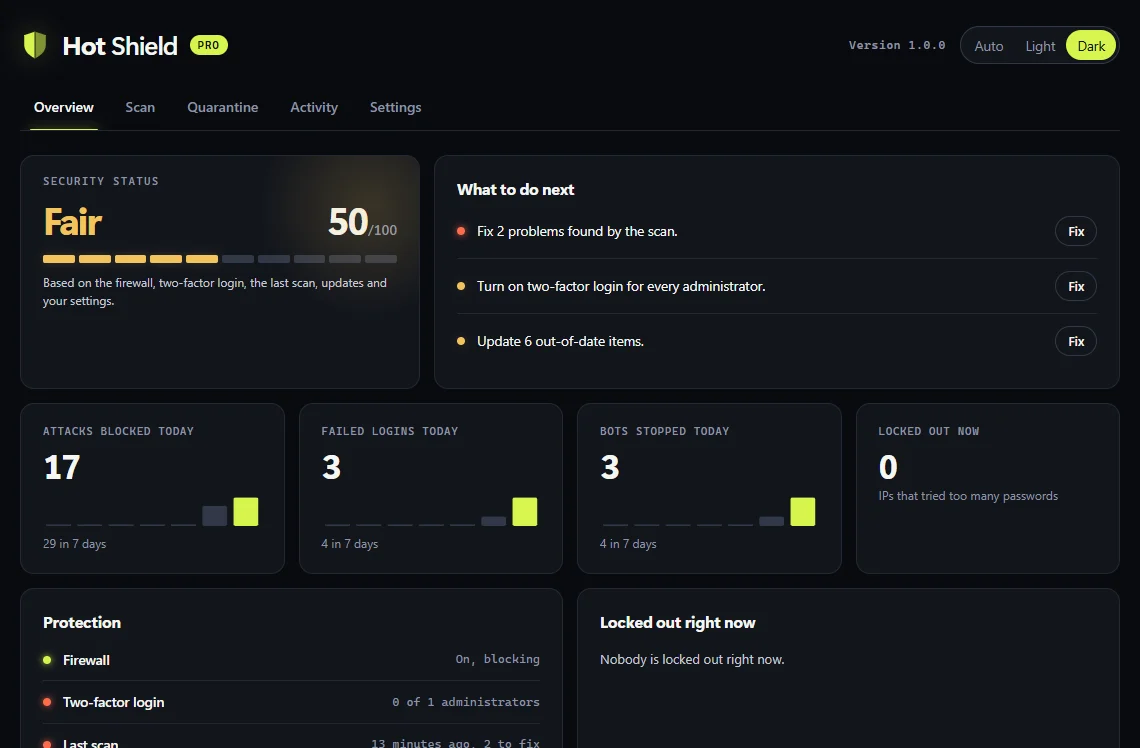
Hot Shield overview screen in its dark look: security status, next steps, attacks blocked today and the protection checklist.
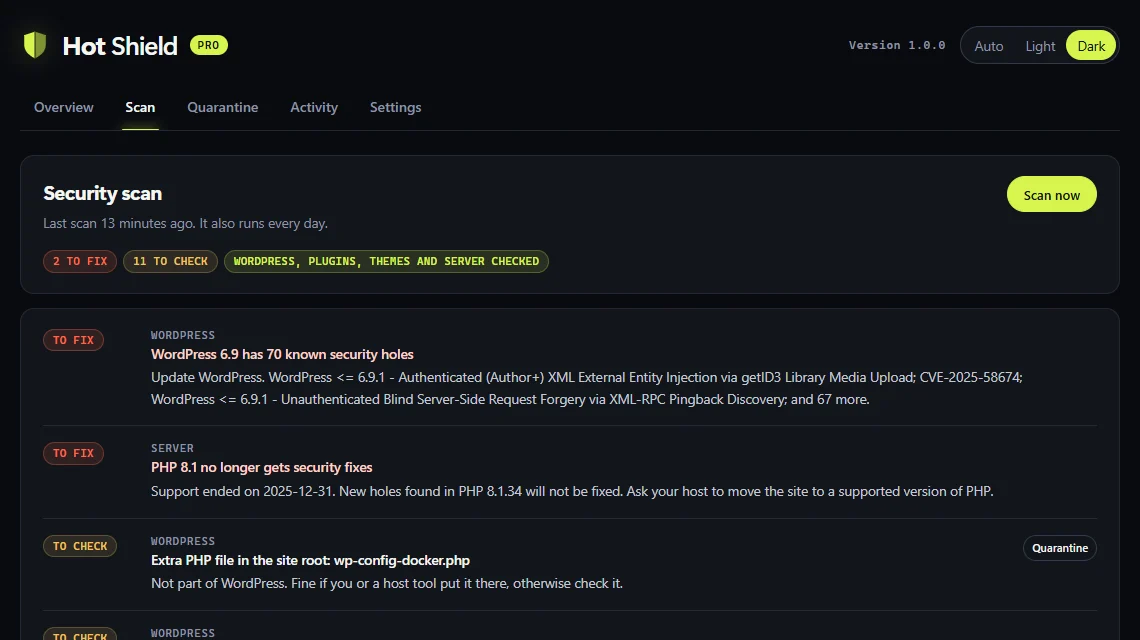
Hot Shield scan results: a WordPress version with known holes and PHP 8.1 out of support, each with what to do.
Scan results say what was found and what to do about it, down to the PHP version on the server.
A status, not a score.

Green, amber or red, and the one thing to fix next.

Safe defaults.

Turn it on and it protects the site. Try the firewall in log-only mode first if you like.

Plain words.

"PHP file in uploads" instead of a threat code.

Dark or light.

Each admin picks their own look, or lets it follow the computer.

Hot Shield Pro

When something gets in, Pro gets it out.

  • Deep malware scanEvery signature, every JS and HTML file, PHP hidden in images, scripts injected into posts.
  • One-click clean-upPuts back official copies of hacked files and quarantines the rest. Undo any time.
  • Daily scansEvery day instead of every week.
  • Country blocking and bansKeep chosen countries off the login, or off the site.
  • Telegram alertsOn your phone as well as by email.
Deep scanScanning
wp-includes/plugin.phpofficial copy
wp-content/plugins/forms/upload.phpofficial copy
wp-content/uploads/2026/10/cache.phpclean
wp-content/themes/store/functions.phpclean
wp-content/plugins/slider/inc/x.phpclean
wp-content/uploads/2026/11/logo.pngclean
wp_options: widget_textclean
0 files checkedClean up

Example scan with made-up file names.

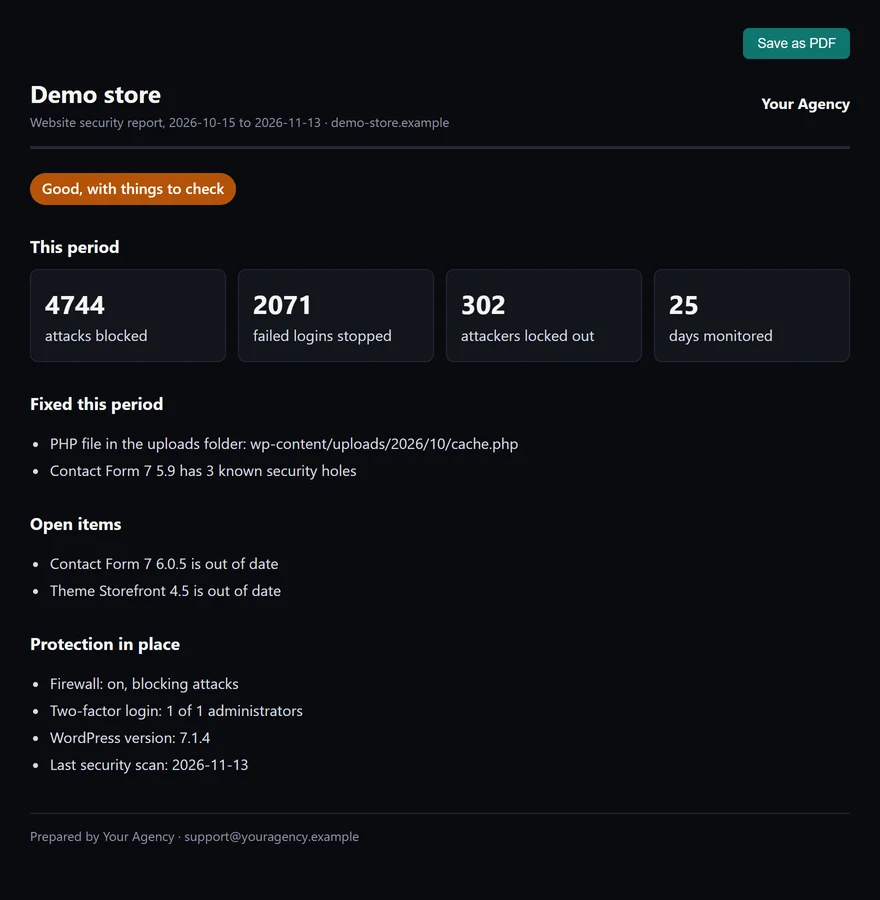
A client security report under an agency's name: attacks blocked, problems fixed, open items and protection in place.
For agencies

Your clients see your name. Not ours.

The Ultimate plan adds a dashboard for all your sites and a monthly report you can send as your own.

  • Every site in one list, worst first.
  • Client reports with your logo, colour and contact, saved as PDF.
  • 90 days of history: attacks blocked, problems fixed, what is still open.
Privacy

Nothing about your visitors leaves your site.

Scans run on your own server. No account, no cloud scanner, no tracking. These are the only outside lookups, and none of them carry personal data.

wordpress.orgVersion numbers of WordPress and your plugins, to fetch the official file fingerprints.
WPVulnerabilityThe same version numbers, plus the PHP and database versions, to look up reported security holes and support end dates.
Have I Been PwnedThe first 5 characters of a scrambled copy of a new password. Never the password.
DB-IP (Pro)A free country list, downloaded once a month, only if you block countries.
Compare

How it compares.

Public prices for one site, per year, and the points buyers ask about most.

Hot ShieldWordfenceMalCareSucuri
Paid plan, 1 site$59$149$99$229
Free versionYes, no account neededYesYesYes
Two-factor login, freeEvery roleYesUp to 2 adminsNo
Where scans runYour serverYour serverTheir serversTheir servers
Malware results, freeAll shownAll shownShown after you payRemote check only
Client reports under your brandIncluded, 10 sitesNot listedNot listedNot listed

From each company's public pricing page and plugin listing, checked November 2026. Prices change; check theirs before you decide.

Pricing

Free to start. Simple yearly plans.

Every plan includes the full free plugin. Pro adds the clean-up tools; the larger plans add the agency dashboard.

Free

1 SITE
$0
  • All five layers
  • Two-factor login for everyone
  • Weekly file, malware and server check
  • Email alerts
Get it free

Starter

1 SITE
$59 /yr
  • Everything in Free
  • Deep scan and one-click clean-up
  • Daily scans
  • Country blocking, bans, Telegram
Choose Starter

Small team

5 SITES
$119 /yr
  • Everything in Starter, on 5 sites
Choose 5 sites
For agencies

Ultimate

10 SITES
$199 /yr
  • Everything in Starter, on 10 sites
  • Dashboard for all your sites
  • Client reports under your name
Choose Ultimate

Agency

25 SITES
$299 /yr
  • Everything in Ultimate, on 25 sites
Choose 25 sites
FAQ

Questions.

What is Hot Shield?

Hot Shield is a WordPress security plugin made by the BrewingHOT team. It puts five layers in front of a site: a firewall that runs before other plugins, an invisible bot check, login protection, two-factor login and a weekly scan of files, malware and the server. Everything runs on your own site.

Is Hot Shield free?

Yes. The free version has all five layers for one site, with no account needed. Paid plans add Pro: a deep malware scan with one-click clean-up, daily scans, country blocking, automatic bans and Telegram alerts. Starter is $59 a year for 1 site or $119 for 5 sites; Ultimate adds the dashboard for all your sites and client reports under your name, $199 a year for 10 sites or $299 for 25.

Will it slow my site down?

The firewall check takes less than a millisecond per page. Scans run in the background once a week, or once a day with Pro.

What if I lock myself out?

Lockouts end on their own after 30 minutes by default, and only the IP is locked, never your username. You can add your office IP to a "never lock out" list, and renaming the plugin folder over FTP switches Hot Shield off.

What happens if I lose my phone?

Log in with one of your 8 backup codes, or ask another administrator to turn two-factor login off for your account.

Does it check my hosting too?

Yes. Every scan looks at the PHP and database versions on the server and tells you if one no longer gets security fixes or has known holes, with a note to send your host. It also flags risky settings like error messages shown to visitors or a debug log in a public folder.

Does it work behind Cloudflare?

Yes. Choose Cloudflare as the source of visitor IPs, and Hot Shield only trusts that header when the request really comes from Cloudflare. Behind another proxy or CDN, choose the X-Forwarded-For header and list the proxy addresses, so every visitor keeps their own IP.

Can I use it with WooCommerce?

Yes. Checkout, the store API and the WooCommerce login form are covered and tested, including addresses that contain words like "select" or "union".

Can the one-click clean-up break my site?

It only puts back official copies of WordPress and plugin files, and only moves loose files into quarantine, always with a backup first. Theme and custom plugin files are flagged for a hand fix instead, and anything in quarantine can be put back.

Who makes Hot Shield?

The BrewingHOT team, a web agency that looks after WordPress and Shopify sites.

Attacks stop at the door. Your site carries on.